Sharing and exporting
Send a link that needs no account, print a solfa or jianpu PDF, send an MP3 they can just play, embed a score in a site, or export MIDI for a DAW.
Verified against 0.5.0 · app is now 1.0.0
Share a link
Share puts your score on the web at a short link. Anyone who opens it gets a read-only viewer with playback — no account, no install, on any phone. That’s the point: your choir shouldn’t need to sign up to read the music.
Shared scores are live. Keep editing and the link updates for everyone watching it, which is genuinely useful when the link is up on a projector and you’re fixing a wrong note from the piano.
Keeping a score someone shared with you
A shared page has a Save a copy button in its top right. It puts the score in your library as a new score you can edit, transpose, re-key and print. The original is untouched and stays the author’s — a share link is read-only, and this is the honest version of “let me work on this”.
If you’re not signed in when you press it, you’ll be asked to sign in first and then land straight in your copy — you don’t have to find the link again.
The Share dialog also offers an embed snippet — an <iframe> you can paste
into a church website or blog post, so the score plays inline there. There’s a
white-label toggle that drops the DomiSol credit from the embed.
Export a sheet
Export offers ten formats.
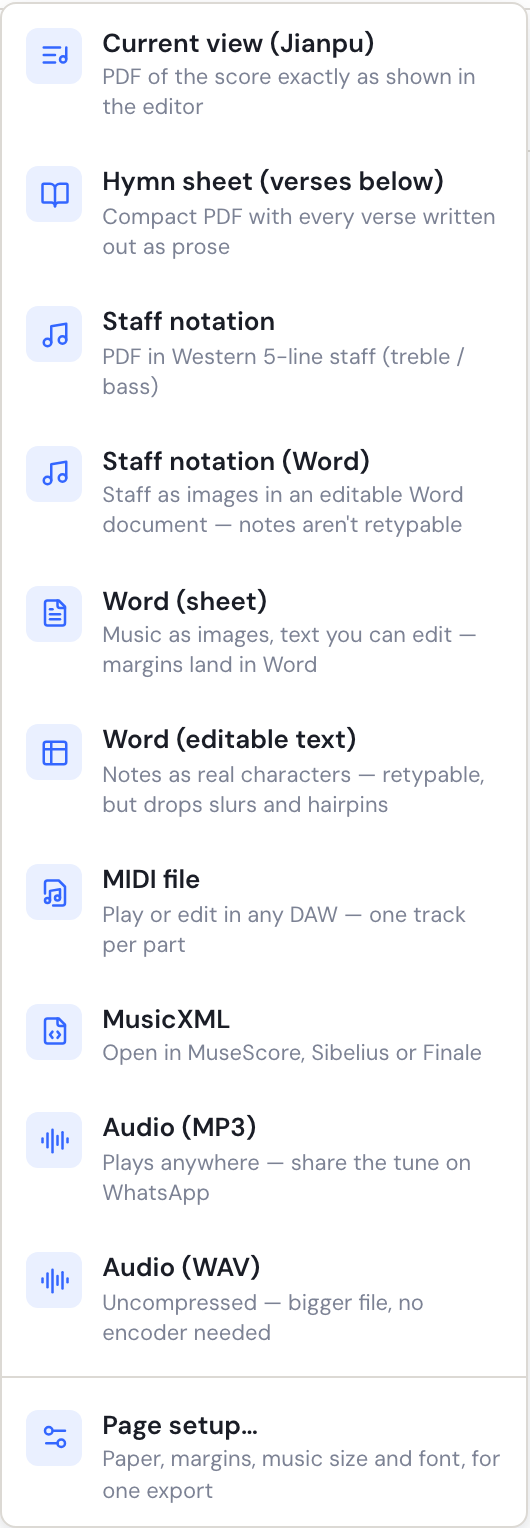
| Format | What you get |
|---|---|
| Current view | A PDF exactly as the editor shows it — solfa or jianpu, whichever is displayed |
| Hymn sheet (verses below) | A compact sheet with the verses written out as text below the music |
| Staff notation | Your score on a Western five-line staff, as a PDF |
| Staff notation (Word) | The same five-line staff, in a .docx with editable text around it |
| Word (sheet) | A .docx — music as images, all the text editable, your page setup carried into Word |
| Word (editable text) | A .docx where the notes are real characters in a table you can retype |
| MIDI file | A .mid for any DAW, one track per part |
| MusicXML | A .musicxml to open in MuseScore, Sibelius or Finale |
| Audio (MP3) | A compressed audio file of the score — the one to send someone |
| Audio (WAV) | The same audio, uncompressed: a much bigger file, no encoder involved |
Current view is the one most people want: it’s the notation your singers read, laid out for paper. Switch the display to jianpu before exporting if that’s what you’re handing out — the export follows what’s on screen, which is why the menu item names the current notation.
Hymn sheet (verses below) is for the case where the music is short and the words are long: one system of notation, then verses 2–5 as text underneath, the way a hymnbook sets it. (It is one song. A whole book of them is a hymnbook.)
Staff notation exists so you can hand a piece to someone who reads staff — an organist, a guest instrumentalist. It’s an export only. DomiSol doesn’t edit staff notation and isn’t trying to.
Staff notation (Word) is the same engraving, laid into a .docx instead of
a finished PDF — one image per line of music, with the title, composer,
key/meter line, verses and any notes you added as real Word text. Take it when
the staff has to go inside something else: a service order, a school
worksheet, a submission form, a publisher’s template. The two files break their
lines in exactly the same places, so the Word one is not a different edition of
the piece — but as with the other Word exports, the notes are pictures and
cannot be retyped there.
Word
There are three, because “I want to edit it further” turns out to mean several different things. Two of them put the solfa or jianpu into Word; the third (above) puts a staff there.
Word (sheet) is the faithful one. Each system of music comes through as a high-resolution image, and the title, composer, verses and any notes you added are real Word paragraphs. Your paper size and margins arrive as Word’s own page setup, so you can change them there, add a header, or paste the hymn into a service sheet. The music itself is a picture — you cannot re-note it in Word.
Word (editable text) goes the other way: every note is a real character in a table, duration beams are the cell borders under them, and the lyrics sit in a row beneath. You can retype it, change the font, or fix a wrong note by typing over it. The cost is real: slurs, hairpins, ties, tuplet brackets and glissandi have no Word equivalent and are left out, so it will not look like your sheet.
If you are not sure which you want, take the sheet. It is the one that matches what you see.
MIDI carries the articulations and dynamics through, with one track per voice so an SATB score opens cleanly separated in a DAW.
Audio is for the singer who can’t read the notation yet. DomiSol renders the score to sound and downloads it — faster than real time, entirely in your browser, so nothing is uploaded and there is nothing to wait for on a server. MP3 is the one to send: it’s small and it plays anywhere, including WhatsApp. WAV is the same audio uncompressed, for the rare case you want it lossless.
The render uses each part’s chosen instrument, so a score set to the recorded grand piano exports as that. It ignores mute, solo and practice speed — the file is the whole piece as written — and the level is lifted so it’s audible on a phone speaker whichever voices you used. Audio export is capped at six minutes; past that, export MIDI instead.
Audio export appears on your own scores. It isn’t offered on a shared score page, because rendering minutes of audio is the recipient’s battery, not a choice they made by opening a link.
Staff notation — PDF or Word — MIDI, MusicXML and both solfa/jianpu Word exports are Pro features. The solfa/jianpu PDF and audio are always free — the point of the audio file is the person at the other end, and gating that on the sender’s plan gets it backwards.
Page setup
Page setup… sets the paper your score is engraved onto: size (A4, Letter, Legal, A5, B5 or your own measurements), portrait or landscape, margins, how big the music is drawn, how many bars go on a line, and the text face.
You can reach it two ways, and they do different things on purpose:
- Score tab → Page setup… saves it on the score. Every export follows it from then on, it survives a reload, and it is undoable like any other edit. This is the one to use if your choir always prints on A5.
- Export → Page setup… changes it for one export only. The score keeps whatever it had. There is a “Save as this score’s default” button in that dialog if you decide you want to keep it after all.
Changing the paper does not shrink the music. A narrower page fits fewer bars on a line and gets more lines; the notes stay the size they were. If you want them smaller or larger, that is the Music size slider, which is separate for exactly this reason.
The font sets the printed sheet’s title, its key and tempo line, the notes themselves and the lyrics. Music size scales the whole sheet together, so it is also the way to print the lyrics larger or smaller.
Bars per line is a property of the score rather than of one export — every renderer honours it, including the editor canvas and a shared link — so it saves even when you set it from the export dialog. The dialog says so.
Getting music in
The reverse trip lives under Create:
- Import MusicXML / MIDI — from MuseScore, Finale, Sibelius or a DAW. Staff notation is converted to solfa/jianpu on the way in.
- Photo → score (in the ⋯ menu) — a photo or PDF of a printed, handwritten, solfa, jianpu or hymnbook page, recognised into an editable score.
- Paste notation — type or paste jianpu/solfa text.
- Sing to score — hum along to a metronome and get notation back.
Where to go next
- Playing your score back — before you send it.
- Your first score — the basics, if you jumped in here.