Repeats, endings and D.S.
Send the singers back to the verse: repeat barlines, a 2x or 3x play count, 1st and 2nd endings, and D.C./D.S./Fine — all of which playback obeys.
Verified against 0.5.0 · app is now 1.0.0
A hymn is rarely written out in full. It repeats a section, jumps back to the verse after the chorus, and stops somewhere in the middle of the page. All of that lives in the Layout tab, and all of it is obeyed by playback and by the MIDI export — so if it sounds right in DomiSol, it is right on the page.
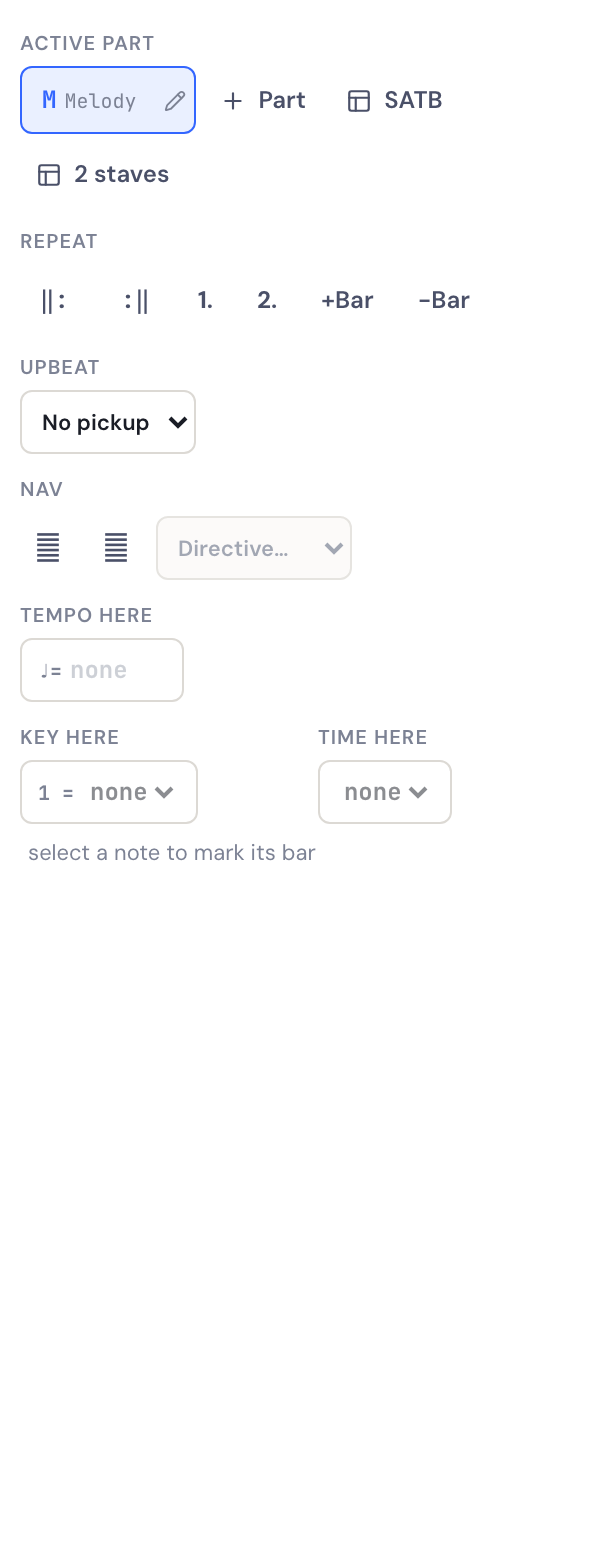
Everything here acts on the bar of the note you have selected, and applies to every voice at once, so SATB bar lines never come apart.
Repeat barlines
Select a note in the first bar of the section and press ‖:; select a note in the last bar and press :‖. That’s it — the bracketed section plays twice.
If the section starts at the beginning of the piece you can leave the opening repeat off. A closing repeat with no opening one sends you back to the start.
Playing it more than twice
A plain :‖ means “play it twice”. When you want three or four, a count
menu appears next to the closing repeat once you’ve set one — choose 3×,
4×, and so on. DomiSol prints the number over the repeat, the way a hymnal
does, and plays the section that many times.
Choosing 2× clears it again, because that is what a bare :‖ already
says and printing it twice is just something for the reader to double-check.
1st and 2nd endings
Where the last bar or two differ between passes, mark them: select a note in the first ending’s bars and press 1., and the second ending’s bars 2. Consecutive bars sharing a number form one bracket.
On the first pass DomiSol plays the 1st ending and skips the 2nd; after the repeat it does the opposite. This works with a play count too — a section played three times can carry a 3rd ending.
Going back: D.C., D.S. and Fine
The Nav row holds the directives that reroute the piece.
| Mark | Means |
|---|---|
| D.C. | Da capo — go back to the very beginning |
| D.S. | Dal segno — go back to the sign (𝄋) |
| 𝄋 Segno | The place a D.S. returns to |
| 𝄌 Coda | The tail the piece finishes on |
| To Coda | Leave here for the coda, on the al-Coda pass |
| Fine | End here, on the way back |
Put the directive on the bar where the jump happens — almost always the last bar of a section — and the target mark on the bar it returns to.
Fine only works on the way back. It ends a return pass, so it needs a D.C. or a D.S. later in the score to create one. A Fine on its own has nothing to end, and playback runs past it. You don’t have to spell out “D.C. al Fine”: if a Fine is printed anywhere, any return pass stops there.
Going back to a named section — reff to bait
A score has exactly one segno, so it can express exactly one return point. A song that runs verse → chorus → verse → chorus needs more than that, and the places it goes back to are already named.
So: give the bar a heading first (Text tab → Section — “Bait 1”, “Refren”, “Verse 2”), then select the bar you want to jump FROM, choose D.S. in the directives menu, and pick the heading from the Back to menu beside it.
DomiSol prints → Bait 1 on that bar rather than “D.S.”, because a section name and a “D.S.” together would be telling the reader to look for a sign that isn’t on the page.
You can use as many of these as the piece needs; each one is taken once, in the order playback meets it. Combine it with al Fine to end somewhere other than the last bar:
→ Refren al Fine— go back to the bar headed “Refren”, and stop at the Fine.
If you rename a heading after pointing a jump at it, nothing breaks: the jump falls back to behaving like an ordinary D.S. Re-pick the new name from the menu when you notice.
Checking it
The fastest way to know a piece navigates correctly is to press play and listen — the playhead walks the bars in the order they will actually be sung, repeats and jumps included. The bar counter in the transport bar follows it.
If a section is being skipped, check that the directive is on the bar you think it is: marks belong to the bar of the selected note, and it is easy to have a note in the previous bar selected when you press the button.