Most people who write tonic solfa do it on a phone. The new anthem arrives as a photo of somebody’s handwritten sheet, the alto line gets corrected on the bus, and the finished score goes to the choir on WhatsApp. A notation program that only works on a computer is no help to any of that.
DomiSol for Android is a tonic solfa app built for that phone. It writes solfa and jianpu as the notation itself, not as letters printed under a staff, and it is the same editor as the one in the browser, signed in to the same account.
What the app does
- Writes tonic solfa and jianpu.
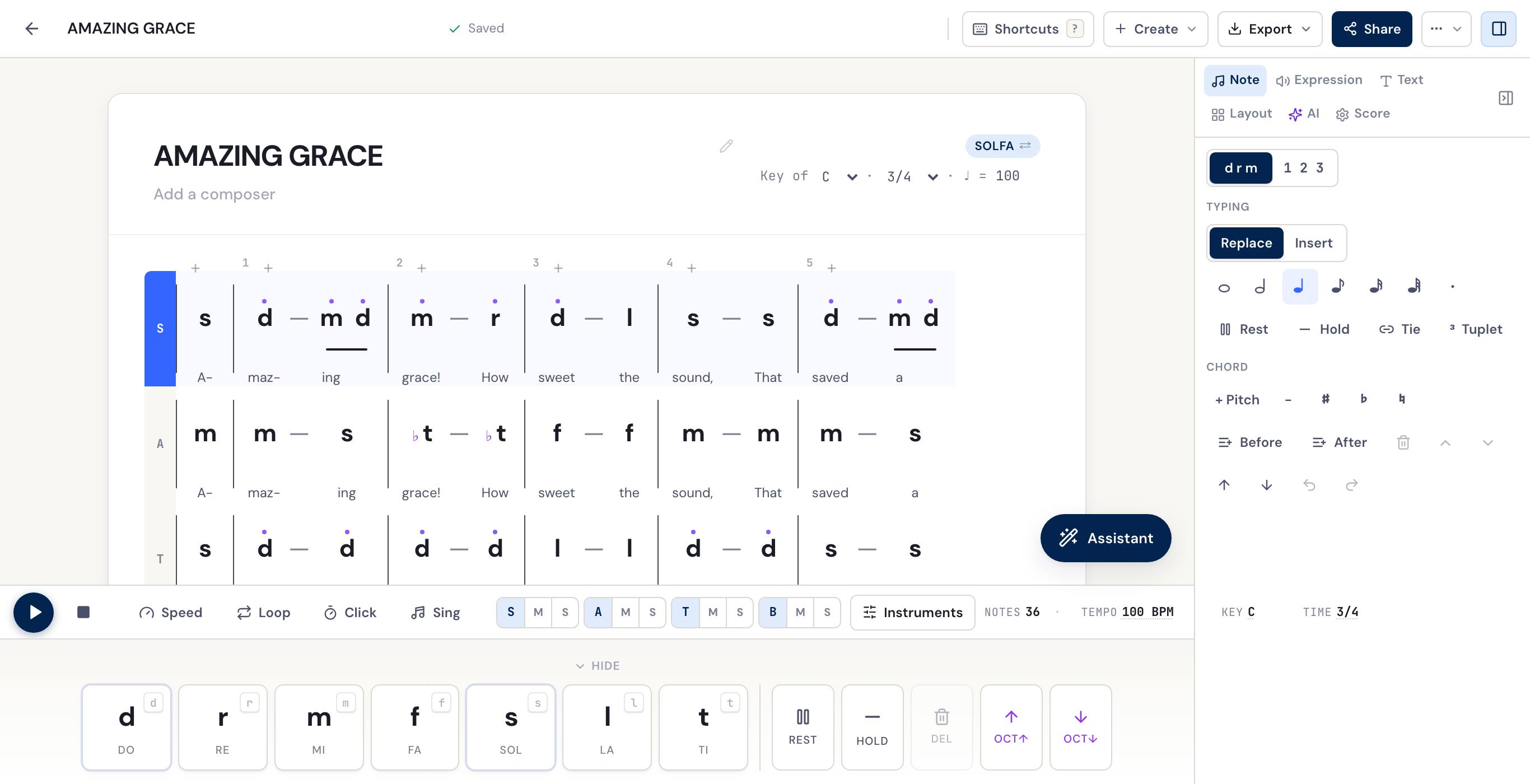
d r m f s l tor1 2 3 4 5 6 7, with the octave marks, the beat and the key as a choir reads them. One button switches the same score between the two. - Holds four parts together. Add SATB and soprano, alto, tenor and bass sit one under another, with their bars locked, so a bar added to the tenor is added to everyone.
- Puts the words under the notes, one syllable per note, verse by verse.
- Reads a photo of a printed hymnbook, a jianpu page or a handwritten solfa sheet, and turns it into a score you can edit and play.
- Plays it back, with the note you are on lit as it goes. Mute or solo a voice for sectional rehearsal, slow it down, or loop a few bars.
- Shares it. A link opens the score on any phone, with no account needed to read it. The solfa or jianpu PDF prints on A4 or Letter.
Get it
Search for DomiSol on Google Play, or use the button above. The listing is called DomiSol: Solfa & Jianpu Editor. The iPhone app is in early access through Apple’s TestFlight, and anyone can join with the second button.
Write your first score
On My Scores, tap + and choose Blank score. The key printed at the top right of the score is a button: tap it and pick doh.
The notes go in from the keyboard along the bottom of the screen. The pitch keys are the seven degrees. The row above them holds the note lengths and the dot, Rest, and Hold (the dash that holds a note on). 8va and 8vb move a note up or down an octave, and ♯ and ♭ are there for the chromatic notes. Tap a note on the score to select it and change it, or tap blank paper and the keys write at the end of the line.
Up the scale and back down, typed with the pitch keys and Hold:
Key G
| d   r   m   f | s   -   -   - |
| s   f   m   r | d   -   -   - |
Tap d r m | 1 2 3 and the same score reads in jianpu, with the key printed
as 1 = G. Nothing is converted: it is one score, shown the way your singers
read.
Words and parts
Open Lyrics and type one syllable per note. Each one lands under its own note and the cursor moves on.
Open Parts and add SATB for four voices. Tap a part’s name to make it the one you are typing into. Because the bars are locked across the parts, you can write the soprano line all the way through first and then fill in the alto, tenor and bass under it.
Scan a page instead of typing it
If the music already exists on paper, photograph it. Tap +, then Scan sheet music, and take the picture or choose it from your photos. A page costs 8 credits, and every new account starts with 10, enough to try it on a couple of pages.
The score opens with a short review card above it: the key it read, a play button, and arrows that walk you through the bars worth a second look. Play it once against the page before you trust it. Pitches come back well; the octave dots and the lines under short notes are where a scan is most often wrong, and both are easier to hear than to see.
For the best result, fill the frame with the music, keep the page flat, and avoid a shadow across it.
Rehearse with it
Press play and the score plays from the cursor, with the note you are on lit as it goes. In Parts, Mute and Solo sit on each voice’s line, so a tenor can hear the tenor line alone, or everything except it. Practice sets the speed, a click and count-in, a loop over the bars you are learning, and the sound, an instrument or a sung voice.
None of that changes the score. It is how the score plays for you today.
Send it to the choir
Open Export:
- Share a link publishes the score and gives you a link to send. It opens on any phone, in the app or in the browser, and nobody needs an account to read it or play it. Make private again stops the link working.
- Sheet PDF prints the score in solfa or jianpu, whichever it is showing. Hymn sheet prints the first verse under the music and the other verses as text below it, as a hymnbook does.
When the PDF is ready, the phone’s share sheet opens, so it goes straight into the choir’s WhatsApp group.
What is only on the web, for now
The app and the web editor open the same scores, but a few things are only in the browser at dash.domisol.app today:
- staff notation exports (PDF and Word), MP3 and WAV audio, and rehearsal tracks with one file per voice
- importing a MusicXML or MIDI file from another program
- the printed hymnbook PDF (the app makes and orders the book; the web prints it)
- the link and QR code printed on the sheet for singers to scan
Start a score on the phone and finish it on a laptop, or the other way round: it is the same score.
Is it free?
Writing, playback, sharing a link and the solfa or jianpu PDF are free, with no card. On the free plan the PDF carries a DomiSol watermark. Scanning pages and the AI tools (harmonising a melody into four parts, transposing, writing lyrics) spend credits, and every account starts with a free grant. The paid plans add clean exports and a monthly allowance of credits; the prices are on the pricing section of the home page.
Related reading
- Download DomiSol: Android, iPhone and the browser, in one place
- Getting started: the first two minutes, on a phone or a laptop
- Photos, files and recordings: everything about scanning a page
- Tonic solfa primer: the seven syllables and movable do
- DomiSol for church choirs: the rest of the rehearsal week
- The best free solfa editors: how DomiSol compares with the others
Frequently asked questions
- Is there a tonic solfa app for Android?
- Yes. DomiSol is on Google Play as DomiSol: Solfa & Jianpu Editor. It writes tonic solfa (d r m f s l t) and jianpu (1 2 3 4 5 6 7) on a phone, plays every voice back, reads a photo of a printed page into a score you can edit, and shares a score as a link or a PDF.
- Is the DomiSol app free?
- Writing, playback, sharing a link and the solfa or jianpu PDF are free. On the free plan the PDF carries a DomiSol watermark. Scanning a page and the AI tools spend credits, and every new account starts with a free grant of them. The paid plans add clean exports and a monthly allowance of credits.
- Is there an iPhone version?
- The iPhone app is in early access through Apple's TestFlight, and anyone can join from domisol.app/download. On a computer, DomiSol runs in the browser at dash.domisol.app with nothing to install.
- Can I use the same scores on my phone and my computer?
- Yes. Sign in with the same account and every score, folder and hymnbook is in both places. A plan belongs to the account, so one bought on the web works in the app and the other way round.
- Does it work on a slow connection?
- Yes. If the connection drops while you write, the save waits and lands by itself when you are back online, and the title says Not saved yet until it does. Scanning a page needs a connection, because the page is read on DomiSol's servers.
- Can the app read a photo of a hymnbook?
- Yes. Tap +, then Scan sheet music, and photograph the page. It reads printed staff notation, jianpu, and printed or handwritten solfa, and the result opens as a score you can correct and play. Play it back once against the page: octave marks and the lines under short notes are where a scan is most often wrong.