Tonic solfa, the movable-do system that writes the major scale as d r m f s l t, is read by hundreds of millions of musicians, especially across African church choirs, British classroom music, and global choral traditions. Yet, like jianpu, it’s surprisingly under-served by software. Most “music notation” tools treat solfa as an afterthought: a plugin, an export format, a checkbox.
This post compares the genuinely useful options for writing tonic solfa in 2026, with an honest note on where each one wins. We make DomiSol, so take point #1 with the appropriate pinch of salt, but the rest of the list is what we’d actually recommend to a friend, including the cases where another tool fits better than ours.
What makes a good solfa editor
The criteria we weigh below:
- Writes solfa natively vs converts from staff. Native means the data model is solfa, you type
d r m f s l tand that’s what you get. Converted means it stores staff data and renders syllables via a transform. Native is better for solfa-first workflows. - Cost, actually free, freemium, or paid.
- Platform, web, desktop, mobile.
- Playback, can you hear what you wrote?
- Sharing, can a collaborator open your score without installing anything?
- SATB & lyrics, does it handle four-part choral writing with aligned lyrics?
1. DomiSol, purpose-built solfa (and jianpu) editor
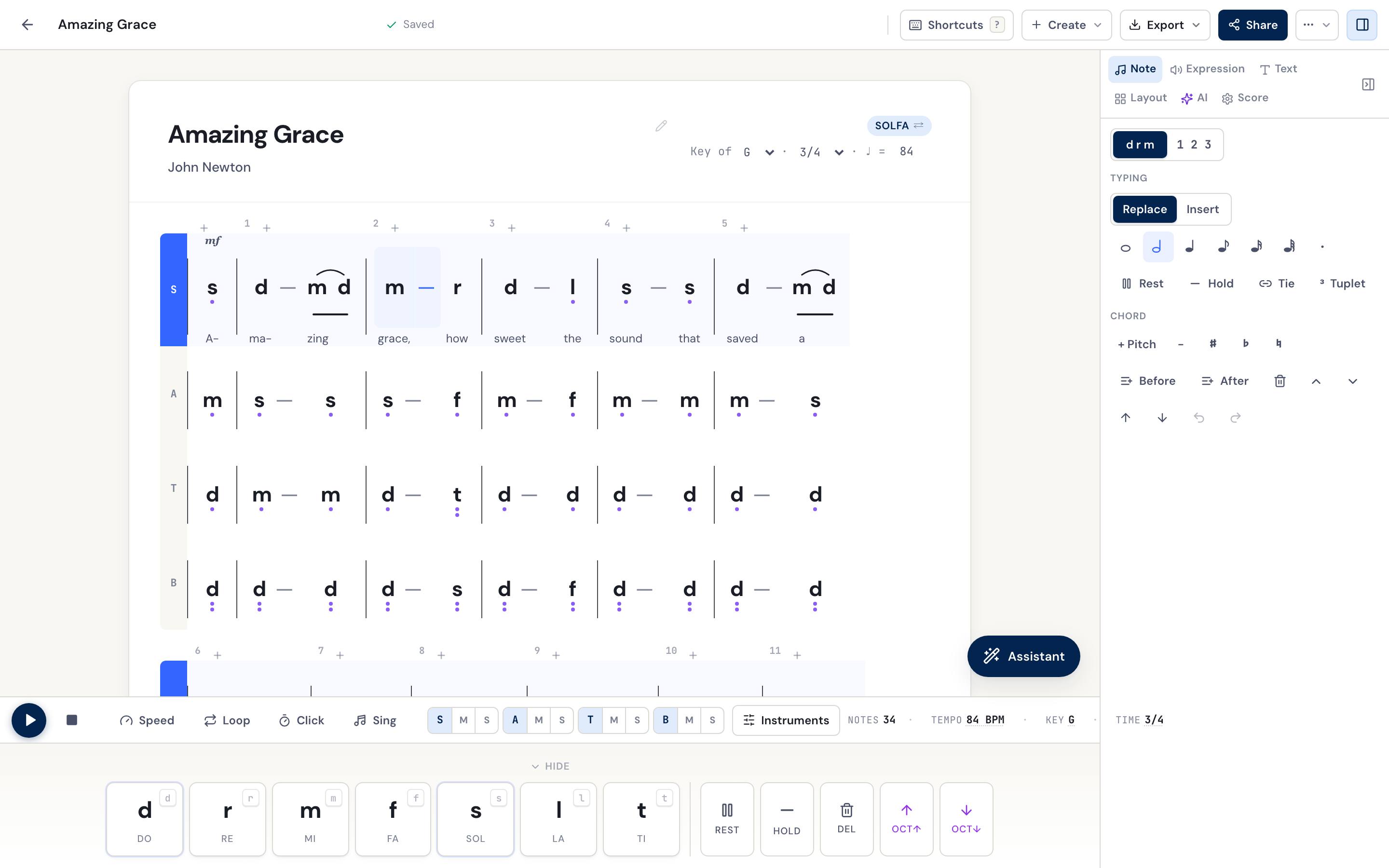
TL;DR: Web-based editor where solfa is the native editing mode. Type d r m f s l t, hear it play, arrange SATB, export PDF, share by URL. Free to start, nothing to install.
| d : d | s : s | l : l | s :- |
Best for: Choir directors, music teachers, church musicians, and students who want to write solfa today without learning notation software. Anyone who needs to share a score with someone who won’t install an app.
Pricing: Permanent free tier — unlimited scores, playback, sharing and solfa/jianpu PDF, no card. Paid plans cover the AI credits and the print-ready exports.
Strengths:
- Solfa is the native data model, no staff-notation detour, and movable-do transposition is one click
- One-click toggle between solfa and jianpu for people who read both
- Live audio playback with note-by-note highlighting
- One-click SATB, with lyrics that align under every part
- Share via URL (opens in any browser, no account) and print-ready PDF export
- Image-to-score recognition: photograph a hymnbook page, get an editable solfa score
- Works in any browser, including on a low-end phone, and as an Android app on Google Play
- Multiple lyric verses under a single part, all the stanzas written out, not just verse 1
- Section and rehearsal labels plus free-text notes, so the page reads like a real service sheet
- Hymnal-layout PDF export with the verses spelled out, the way African and Indonesian hymnals actually print
- Embeddable score widget, drop a playable solfa score into a blog or church website with an iframe
- MIDI and MusicXML import, bring an existing file in and it converts to editable solfa
- Installs to your phone like an app (PWA), add to home screen, loads even on a flaky connection
Weaknesses (the honest part):
- Young software, rough edges are still being smoothed
- PDF output is functional but not yet at the polish of a dedicated typesetting house
- No staff-notation editing — staff notation is a live PDF export feature, but you can’t edit on a five-line staff; if you write staff music daily, you’ll want another tool too
Try it: Open the free online tonic solfa editor, or jump straight into dash.domisol.app.
2. Solfacity, dedicated tonic solfa editor
TL;DR: A tonic-solfa-focused score editor with MIDI playback, available on the web and as an Android app.
Best for: Solfa writers who want a dedicated, mobile-first tool, especially on Android.
Pricing: Free, with an Android app on Google Play.
Strengths:
- Purpose-built for tonic solfa, not a staff editor in disguise
- Native Android app for phone-based composition
- Built-in MIDI playback
Weaknesses:
- Solfa-focused, not the tool if you also need jianpu in the same workflow
- Sharing and collaboration are more limited than a URL-first web app
- Heavier mobile-app footprint than an install-free browser editor
Try it: solfacity.com
3. sol2snd, sol-fa editor and transcriber
TL;DR: A sol-fa notation editor that also transcribes between sol-fa and staff notation, with MIDI support and text/file input.
Best for: People who need to move music both ways between sol-fa and staff, e.g. converting a staff score into sol-fa, or vice versa.
Pricing: Free to use online.
Strengths:
- Two-way transcription between sol-fa and staff notation is its standout feature
- Accepts text input or file upload
- MIDI support for playback and export
Weaknesses:
- The interface is more utilitarian than a modern editor
- Less geared toward choral SATB + lyrics workflows
- Sharing is file-based rather than link-based
Try it: sol2snd.com
4. MuseScore + a solfa plugin
TL;DR: The free, open-source desktop notation app, with a community plugin/workflow to produce tonic sol-fa output from staff scores.
Best for: People who already use MuseScore for staff notation and need occasional solfa output.
Pricing: Free, open source.
Strengths:
- Industry-standard engraving, the staff output is excellent
- Huge community, plugins, templates, and forum answers
- Cross-platform desktop (Mac, Windows, Linux); clean MusicXML import/export
Weaknesses:
- Staff-first, solfa-second, you write staff notation and convert; you can’t type solfa directly
- Desktop install required to edit; a score published to MuseScore.com can be shared at a link, but editing it means opening the file in MuseScore
- Solfa conversion quality varies with score complexity
Try it: musescore.org
5. Sibelius with the Tonic Sol-Fa plugin
TL;DR: The professional notation suite plus an “Add Tonic Sol-Fa” plugin that typesets sol-fa beneath staff notation.
Best for: Professional engravers already invested in Sibelius who need sol-fa as an addition to staff scores.
Pricing: Paid (Sibelius is a commercial product), though the plugin itself is free.
Strengths:
- Top-tier engraving and a mature professional workflow
- The plugin integrates sol-fa into an existing Sibelius pipeline
Weaknesses:
- Not free, and not solfa-native, solfa rides along under staff notation
- Heavy, professional-grade tool; overkill for someone who just wants to write solfa
6. Pen and paper
TL;DR: The honest baseline, lined paper and your handwriting.
Best for: Sketching ideas, teaching solfa in a classroom without devices, or a backup when the laptop dies before rehearsal.
Strengths: Zero learning curve, no electricity or licence, genuinely fast for simple scores.
Weaknesses: No playback, no sharing without a photo, no transposition without rewriting, and good luck reading it six months later.
7. Word with a custom font
TL;DR: The workaround, type syllables, add the underlines and dots by hand, print.
Best for: Someone who already knows Word and needs a single simple page once.
Strengths: No new software; familiar interface.
Weaknesses: Spacing falls apart past a few measures, no playback, no editable sharing, no transposition. The output looks unmistakably “made in Word.”
How to pick
- You want to write solfa today, free, with playback and easy sharing. Use the DomiSol solfa editor. Web-based, nothing to install.
- You want a dedicated Android app for solfa. DomiSol and Solfacity both have one on Google Play.
- You need to convert between sol-fa and staff notation. Use sol2snd, or DomiSol’s image-to-score for photos of printed scores.
- You already live in MuseScore. Install a numbered/solfa plugin and convert when you need to.
- You teach solfa to children without computers. Pen and paper, the notation was designed for it.
Related reading
- The DomiSol solfa editor, write d r m f s l t or 1 2 3 in your browser
- Tonic solfa primer: read & write d r m f s l t, the notation explained
- The best tools for writing jianpu in 2026, the numbered-notation companion to this list
- Hymn library, free public-domain hymns in solfa & jianpu, editable in a click
Frequently asked questions
- What's the best free solfa editor?
- For most people, choir directors, music teachers, students, DomiSol is the best free option: it's web-based, solfa is the native editing mode, and it does playback, SATB, lyrics, PDF export, and share links with nothing to install. Solfacity is the strongest dedicated alternative, especially on Android. MuseScore + a plugin is best if you already live in MuseScore for staff notation.
- Is there a free solfa editor online?
- Yes. DomiSol runs entirely in the browser and has a permanent free tier, no download, no card. Solfacity also offers a web editor alongside its Android app. Both let you write tonic solfa, hear it back, and share it.
- Can I write solfa on my phone?
- Yes. DomiSol has an Android app on Google Play, and it also works in any mobile browser with touch input. Solfacity has a dedicated Android app too. Both are usable on a phone for note entry and playback.
- Can I convert sheet music to solfa for free?
- DomiSol converts a photo or PDF of a printed, handwritten, or hymnbook score into editable solfa via image recognition (for paying accounts, from the 7-day Pass or any credit pack). sol2snd transcribes between sol-fa and staff notation. MuseScore can convert staff scores to solfa output with a community plugin.