Jianpu, 简谱, “simplified notation”, numbered musical notation, is the music writing system that uses the digits 1 2 3 4 5 6 7 for the seven notes of the major scale, with octave dots above or below and underlines for shorter durations. It’s the standard notation across China, Taiwan and Indonesia, also used in Japan, Myanmar and elsewhere, and read by something on the order of a billion musicians.
For a music tradition that big, it’s striking how few good tools exist for actually writing it. The situation in 2026 is roughly:
- Two genuinely good free options (one purpose-built, one plugin)
- One serious open-source option for power users
- A cluster of China-market apps, a few now multi-platform and English-capable
- Various workarounds involving Word documents, custom fonts, and brave souls
This post compares all of them honestly. We make DomiSol, so caveat emptor on point #1, but the rest of the list is what we’d recommend to a friend, including the cases where another tool would suit their workflow better than ours.
What we’re optimizing for
Different users want different things from a notation editor. The criteria we weigh below:
- Writes jianpu natively vs converts from staff. Native = the editor’s data model IS jianpu; you type
1 2 3 4 5 6 7and that’s what shows up. Converted = the editor stores staff data and renders it as numbers via a transform. Native is generally better for jianpu workflows; converted is better if you’re working in mixed notations. - Cost, free, freemium, paid.
- Platform, web, desktop, mobile.
- Learning curve, minutes, hours, or days to get a usable score out.
- Output quality, does the printed PDF look like a real Chinese-music-school jianpu page, or does it look like staff notation with numbers stuck on top?
- Sharing, can you send a score to a collaborator without forcing them to install software?
1. DomiSol, purpose-built jianpu editor
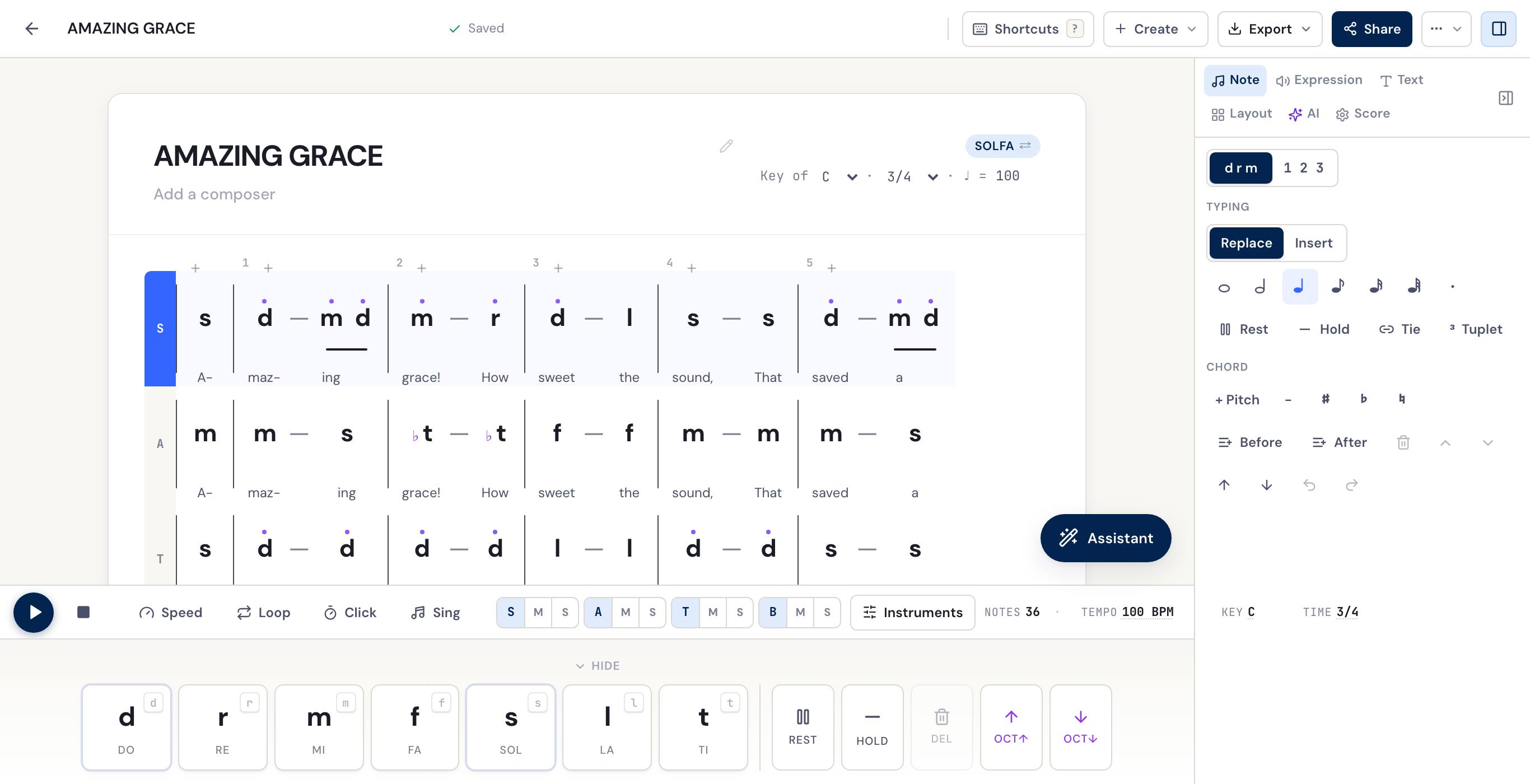
TL;DR: Web-based jianpu (and solfa) editor where the data model IS jianpu. You type 1 2 3 4 5 6 7, you see jianpu. Free to start, no installation, share via URL.
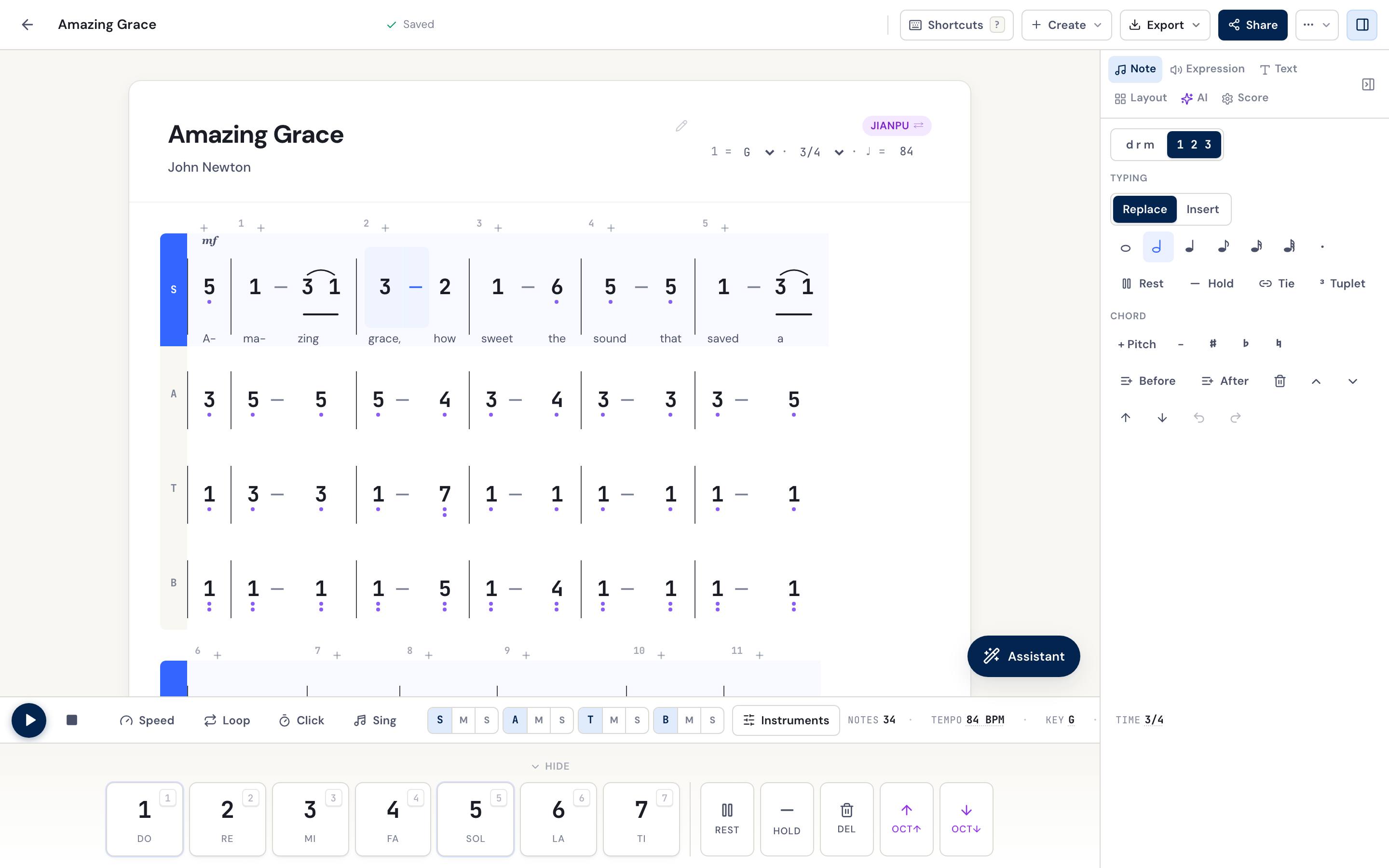
Best for: Jianpu writers who want a clean editing experience and easy sharing. Choir directors writing SATB hymns. Indonesian, Chinese, and Taiwanese music educators teaching from a single canvas. Anyone who needs to send a score to a collaborator who doesn’t want to install software.
Pricing: Free tier is permanent for jianpu editing, playback and sharing. Pro covers the AI credits and the print-ready exports; staff-notation PDF export is live.
Strengths:
- Native jianpu data model, no awkward conversions, no “it almost works but the beams don’t render right” surprises
- One-click toggle between jianpu and tonic solfa for users who work in both
- WhatsApp-friendly URL sharing (the entire point of the editor for choir directors who run their groups via group chats)
- Live audio playback so you can hear what you wrote before printing
- Built-in image-to-jianpu recognition (drag in a hymnal photo, get an editable jianpu score)
- AI features: harmonize melody to SATB, transpose, lyric translation, hum-to-jianpu
- Multiple lyric verses stacked under one part, so you write all the stanzas, not just verse 1
- Section and rehearsal labels plus free-text annotations, so a score reads like a real service sheet
- Hymnal-layout PDF export with the verses written out, the way Indonesian and African hymnals actually print
- Embeddable score widget, drop a playable jianpu score straight into a church website or blog
- MIDI and MusicXML import, bring an existing file in and it converts to editable jianpu
Weaknesses (what we won’t claim is great yet):
- Young software, new features land often and the occasional bug is still being shaken out
- Printed PDF output is functional but doesn’t yet match the visual polish of a Chinese-music-school typesetting house
- No staff-notation editing — staff PDF export is live, but you can’t edit on a five-line staff; if you need to write staff music regularly, you need a different tool
- Offline has limits: installed as an app (PWA), the editor opens offline once loaded and saves your edits when the connection is back, but the AI features and photo import need a connection
Try it: the online jianpu editor, or open dash.domisol.app directly.
2. MuseScore + Numbered Notation plugin
TL;DR: The free, open-source desktop notation app + a community plugin that adds jianpu numbers to a staff score.
Best for: Users who already work in MuseScore for staff notation and need occasional jianpu output. Composers who want full control over engraving details. Anyone working in mixed notation traditions on the same score.
Pricing: Free, open source (GPL).
Strengths:
- Industry-standard notation engine, the engraving is genuinely good
- Mature ecosystem of plugins, fonts, and templates
- Strong community support; problems have answers on the MuseScore forum
- Cross-platform desktop app (Mac, Windows, Linux)
- Imports and exports MusicXML cleanly
Weaknesses:
- Workflow is staff-first, jianpu-second. You write in staff notation and the plugin adds numbers to it; you can’t type jianpu directly
- The Numbered Notation plugin is community-maintained and has version-compatibility quirks across MuseScore releases
- The plugin reads one voice at a time, does not read the key signature (you set which pitch is 1), and draws no underlines or dashes, so the rhythm stays on the staff
- Desktop install required to edit. A score published to MuseScore.com can be shared at a link, seen and played in a browser, but changing it still means MuseScore
- For someone else to edit it, you send a
.msczfile to someone who has MuseScore installed (or an exported PDF that’s no longer editable)
Try it: musescore.org, then the plugin, step by step: how to write jianpu in MuseScore.
3. LilyPond with a jianpu add-on
TL;DR: Open-source music engraving system with community jianpu add-ons. Text-based input, a real learning curve, and the most beautiful printed output of anything on this list.
Best for: Power users who like text-based workflows, want pixel-perfect engraving, and don’t mind a learning curve. Academic publishers. Anyone who wants their jianpu scores under git version control as plain text.
Pricing: Free, open source.
Strengths:
- Engraving quality is genuinely the best on this list, LilyPond output looks like a printed book
- Not one add-on but several, each with a different approach:
jianpu-ly(closest to just typing1 2 3 4for simple pieces),jianpu10a, andlilypond-jianpu - Can typeset jianpu and a Western 5-line staff together in one score, which almost nothing else here does
- Plain-text input means you can git-version your scores like code
- Cross-platform (Mac, Windows, Linux), runs in headless CI for batch generation
Weaknesses:
- Steep learning curve whichever add-on you pick, expect to spend a weekend with the input syntax before your first usable score
- No GUI; you write LilyPond’s text format and run a compile step to render
- MusicXML import exists (jianpu-ly can read it) but is limited, so expect to hand-write or hand-fix most scores
- Real-time playback is awkward (you compile to MIDI then play that)
- Sharing with non-LilyPond users requires exporting to PDF and giving up editability
Try it: lilypond.org, then pick an add-on — jianpu-ly is the friendliest starting point for numbered notation.
4. OpenJianpu
TL;DR: Research-grade open-source jianpu rendering library. Less an editor, more a typesetting toolkit.
Best for: Developers building jianpu-aware applications. Researchers. Music software companies looking for a base layer.
Pricing: Free, open source.
Strengths:
- Gives you full control over jianpu typesetting at the library level
- Useful as a building block in larger systems
Weaknesses:
- Not an editor, no GUI, no end-user workflow
- Documentation is minimal
- Community is small
Try it: Search “OpenJianpu” on GitHub.
5. Chinese-market apps (Laiyin, Ziipoo, and others)
TL;DR: A cluster of apps built for the Chinese music-education market, a couple genuinely capable, most Chinese-first. Jianpu-native, touch- or desktop-based.
Best for: Phone-based composition, and readers who want a big feature list (OCR, guitar tab, playback) for little money.
Pricing: Freemium, free tiers plus optional paid memberships.
The ones worth knowing:
- 来音制谱 (Laiyin) is the standout, and one of the few that’s genuinely multi-language (English included), so a non-Chinese reader can actually use it. Native jianpu plus staff and tab, AI photo-to-score, and it exports both PDF and MusicXML. Mobile-first (its iPad app also runs on Apple-silicon Macs), actively maintained, and very well reviewed in China (4.8★ from about 17,000 ratings on the China App Store, read on 2026-10-16). ¥198 a year for the full version.
- Ziipoo (易谱) is capable and cross-platform (desktop, mobile, web), with an auto-reflowing layout, OCR, and audio transcription, but read the fine print: on the free tier it stamps a permanent watermark and can’t export PDF at all, and scores you make while free stay that way even after you pay (up to ¥300/year to unlock). Chinese-only interface.
- XunScore packs jianpu, staff, and guitar tab into one editor, but it’s a small hobby project, Windows/Linux only, Chinese-only, and effectively dormant (its repository was last updated in 2023). Worth a look, not something to rely on.
- Older Android-only apps like Jianpu Composer still work for quick phone sketches, but quality varies wildly, so read recent Play Store reviews first.
Weaknesses:
- Chinese-first interfaces (Laiyin is the exception); English documentation is thin to nonexistent
- Free tiers can hide catches, watermarks or export limits, notably Ziipoo, so check before committing a real score
- Print and spacing quality is uneven and hard to judge without trying them; export a test page before trusting one for something you’ll hand out
6. Pen and paper
TL;DR: The honest baseline. Lined paper, a pen, your handwriting.
Best for: Sketching ideas. Teaching jianpu in a classroom without devices. Backup notation for when the laptop battery dies during a Sunday rehearsal.
Pricing: Free.
Strengths:
- Zero learning curve for the tool itself
- Works without electricity, internet, or a license
- No software updates to break your workflow
- Genuinely fast for simple scores once you’ve practiced
Weaknesses:
- No playback
- No sharing without scanning or photographing
- No transposition without rewriting
- Mistakes can’t be undone cleanly
- Hard to read your own handwriting six months later
7. Microsoft Word with a custom font
TL;DR: What grandma uses. Type numbers, add underlines via the underline button, copy in dot characters from the symbol palette. Print.
Best for: Users who already know Word and just need to produce a single jianpu page for printing without learning new software.
Pricing: Word license.
Strengths:
- No new software to learn
- Familiar interface
- Works for very simple monophonic scores
Weaknesses:
- Spacing breaks down quickly for anything beyond a few measures
- Beam underlines are inconsistent
- No playback, no sharing-as-editable, no transposition
- The output is unmistakably “made in Word”, not what you’d want to hand to a paying choir
How to pick
Five practical recommendations based on your situation:
- You’re a choir director, music teacher, or church music minister and you want to start writing jianpu (or solfa) today. Use DomiSol’s jianpu editor. It’s free, web-based, and built specifically for your workflow.
- You’re already a MuseScore power user. Stay in MuseScore and add numbers with the Jianpu Numbered Notation plugin, or export MusicXML when jianpu-reading collaborators need a full jianpu page.
- You’re publishing a printed jianpu hymnal or songbook with serious typesetting requirements. Learn LilyPond. The investment pays off.
- You’re writing one quick score for tomorrow’s class. If you have an hour, try DomiSol. If you have ten minutes and a printer, use Word with a custom font and accept the cosmetic compromises.
- You teach jianpu to children in a classroom without computers. Use pen and paper. The notation is designed for it.
One more case: you already have the score
The comparison above assumes you’re writing something new. Most of the time you aren’t: the score exists, in a songbook or a photocopy or a photo somebody sent you on WhatsApp, and what you actually want is that page, editable, so you can transpose it or fix a wrong note or print parts.
Retyping a page of jianpu takes fifteen minutes if you’re quick, which is why so many choirs simply photocopy and live with the key they were given. DomiSol’s photo import is built for this case, and 来音制谱, above, has an AI photo-to-score too.
Try it on a page you already have
Photograph a page of jianpu and DomiSol marks the note rows, barlines and lyric lines it finds. That first pass runs in your browser — nothing is uploaded and you don't need an account to see it.
Related reading
- Free online jianpu editor, write 1 2 3 4 5 6 7 in your browser, free
- Jianpu primer: read & write 1 2 3 4 5 6 7, the underlying notation explained
- Convert sheet music to solfa or jianpu, drop a MusicXML file into DomiSol
- DomiSol vs Flat.io for choir directors, comparison if you’re choosing a general-purpose editor
Frequently asked questions
- What's the best free jianpu editor?
- DomiSol is the best free option for users who want jianpu as the native editing model, purpose-built, web-based, no installation. MuseScore + the Numbered Notation plugin is the best free option for users who already work in MuseScore and need occasional jianpu output. Both are genuinely free to use: DomiSol's free plan writes, plays back, shares and exports a watermarked PDF, and MuseScore is open source.
- Can I write jianpu in MuseScore?
- With a community plugin, since MuseScore has no jianpu of its own. Write the score on a staff, install the Jianpu Numbered Notation plugin, set which pitch is 1, and run it: it writes the numbers under the staff, one voice at a time. It draws no underlines or dashes, so the rhythm stays on the staff. Free.
- Is there a jianpu editor for Mac/Windows/Linux?
- DomiSol runs in any browser on any OS, no native installer needed. MuseScore is a free desktop app for Mac, Windows, and Linux that supports jianpu via plugin. LilyPond with the jianpu add-on works on all three platforms but requires command-line comfort.
- Can I write jianpu on my phone?
- DomiSol has an Android app on Google Play, and it works in any mobile browser too: try it at dash.domisol.app on your phone. Touch input works for note entry. There are also several apps from the Chinese market; 来音制谱 (Laiyin) is the most capable and even has an English interface, while older Android-only apps like Jianpu Composer are geared toward Chinese-speaking users with limited English documentation.
- How does jianpu compare to staff notation for Chinese instrumental music?
- Jianpu is the dominant notation in Chinese instrumental music (erhu, dizi, guzheng) for the same reason solfa dominates vocal music: it's movable-do, so transposition is free, and it's faster to read for melodically-driven music where pitch relationships matter more than absolute pitch. Staff notation is used for orchestral parts and Western-style ensemble work.
Related
- How to write jianpu in MuseScore: plugins, steps and limits
- Free online jianpu editor & notation software
- Best Free Tonic Solfa Editors of 2026: 4 Compared
- DomiSol vs Flat.io for Choirs (2026 Comparison)
- Chinese music notation: jianpu, gongche and guqin tablature
- Tonic solfa primer
- Jianpu primer
- SATB hymn arranging in solfa
- All blog posts