This is the question we get most often from choir directors evaluating tools: DomiSol or Flat.io, which one should I use?
Short answer: they solve different problems. Flat.io is a general-purpose web-based notation editor optimized for staff notation, used by composers, students, instrumentalists, and educators worldwide. DomiSol is a niche editor optimized for tonic solfa and jianpu, the notations used by African church choirs, Chinese and Indonesian instrumentalists, and global hymnody traditions, with a workflow built around how those communities actually rehearse (WhatsApp sharing, mobile-first display, no installation).
If you read this post and conclude “Flat.io is better for me”, that’s a totally reasonable answer. Use the right tool for your repertoire. The rest of this post tries to make the trade-offs concrete.
Side-by-side feature comparison
| DomiSol | Flat.io | |
|---|---|---|
| Editing surface | Tonic solfa + jianpu native | Staff notation native |
| Staff-notation editing | No (PDF export only) | Full editing |
| Solfa / jianpu | Native editing | Plugin-style support; not the primary workflow |
| Web-based | ✓ | ✓ |
| Installation | None | None |
| Mobile | Android app on Google Play, iPhone app in early access, or any browser | iOS + Android apps |
| SATB workflow | One-click harmonize melody → SATB | Manual voice-by-voice entry |
| Sharing | URL link + embeddable widget, no account to view | URL link or embed; viewer needs account for some features |
| Audio playback | Tone.js synth, browser-native | Tone.js synth + sampled instruments |
| Lyrics | Per-note alignment, multiple verses, multi-language | Per-note alignment |
| AI features | Harmonize, transpose, hum-to-score, lyric translation, image-to-score | Limited |
| PDF export | Solfa/jianpu + hymnal layout, free | Free tier limited; paid for unlimited |
| Staff-notation PDF | ✓ (export) | ✓ |
| MusicXML / MIDI import | ✓ (converts to solfa/jianpu) | MusicXML |
| Cost | Permanent free tier | Free tier (15 scores), paid ~$10/mo |
| Markdown / version control | Score data is JSON, easy to version | Proprietary .flat format |
| Offline | Install as app + offline (PWA) | Limited |
Use-case scoring
Six things choir directors actually do, and how each tool performs.
1. Composing a new hymn from scratch
Flat.io: Open the editor, pick instruments, start placing notes on a staff. Familiar workflow if you read staff. ~10 min to a basic hymn.
DomiSol: Open the editor, type d r m f s l t directly. The notation IS the editing model. ~5 min to a basic hymn for users who read solfa.
Winner: Tied. Use whichever notation you read fluently. The faster tool is the one that matches your reading mode.
2. Arranging an existing tune to SATB
Flat.io: Manual. Enter soprano, then alto, then tenor, then bass, voice by voice. Voice-leading is your responsibility.
DomiSol: AI tab → Auto-harmonize → pick parts (S/A/T/B) → done. Generated arrangement respects voice-leading rules. Lyrics propagate across all four voices automatically.
Winner: DomiSol, by a wide margin. This is one of the things we built specifically because it’s painful in every other tool.
3. Sharing the finished score with the choir
Flat.io: Generate a share link. Recipients can view in browser. Some advanced features (commenting, suggesting edits) require the recipient to have a Flat.io account.
DomiSol: Generate a share link. Recipients view in any browser, no account needed. Designed specifically to be pasteable in WhatsApp/Slack/email and openable on a $100 Android phone over 3G.
Winner: DomiSol if your choir uses WhatsApp groups (which is to say: most choirs in West Africa, East Africa, Latin America, India, and the Caribbean). Flat.io if your choir is centralized on a Western messaging platform and benefits from in-tool commenting.
4. Printing scores for Sunday service
Flat.io: PDF export works on the free tier with watermark / limits; paid tier is unlimited. Engraving quality is professional-grade for staff notation.
DomiSol: PDF export is free, unlimited, works in solfa or jianpu. Print-ready but cosmetically not as polished as Flat.io’s staff output yet.
Winner: Flat.io if you need staff notation PDFs of professional engraving quality. DomiSol if you need solfa/jianpu PDFs (which Flat.io can’t produce natively at the same quality).
5. Transposing a hymn for a different singer or service
Flat.io: Select all → Transpose → pick interval. Notes shift on the staff; key signature updates.
DomiSol: AI tab → Smart transposition → pick new key. Two modes: simple re-key (instant) or smart voice-leading (AI-assisted, keeps singers in range across the new key).
Winner: DomiSol for choir-specific use cases (the smart voice-leading mode is genuinely useful for SATB transposition). Flat.io for general transposition where you don’t need vocal-range awareness.
6. Onboarding a new choir member who doesn’t read music yet
Flat.io: Send them YouTube tutorials on staff notation. Realistic timeline to basic literacy: 6 months.
DomiSol: Send them the tonic solfa primer and the staff-to-solfa guide. Realistic timeline to basic literacy: 1-4 weeks for vocal music.
Winner: DomiSol if the new member is a vocalist (which is to say: nearly everyone joining a choir). Flat.io if they’re an instrumentalist who’ll be reading staff for ensemble work anyway.
Where Flat.io is genuinely better
Three honest situations where Flat.io is the right call:
- You write staff notation regularly. Flat.io is built for staff. DomiSol’s staff notation is export-only (a live PDF export) with no on-staff editing. If staff is your primary mode, use Flat.io.
- You collaborate on scores with multiple editors. Flat.io’s commenting, suggesting, and version-history tools are mature. DomiSol’s collaboration is share-as-read-only — now with live sync, so viewers see your edits in real time — but multi-editor commenting and version history are still roadmap.
- You publish to the Flat.io community library or use it pedagogically in a classroom that’s already on Flat.io. Network effects matter; switching tools mid-curriculum costs you more than you save.
Where DomiSol is genuinely better
Symmetric honesty:
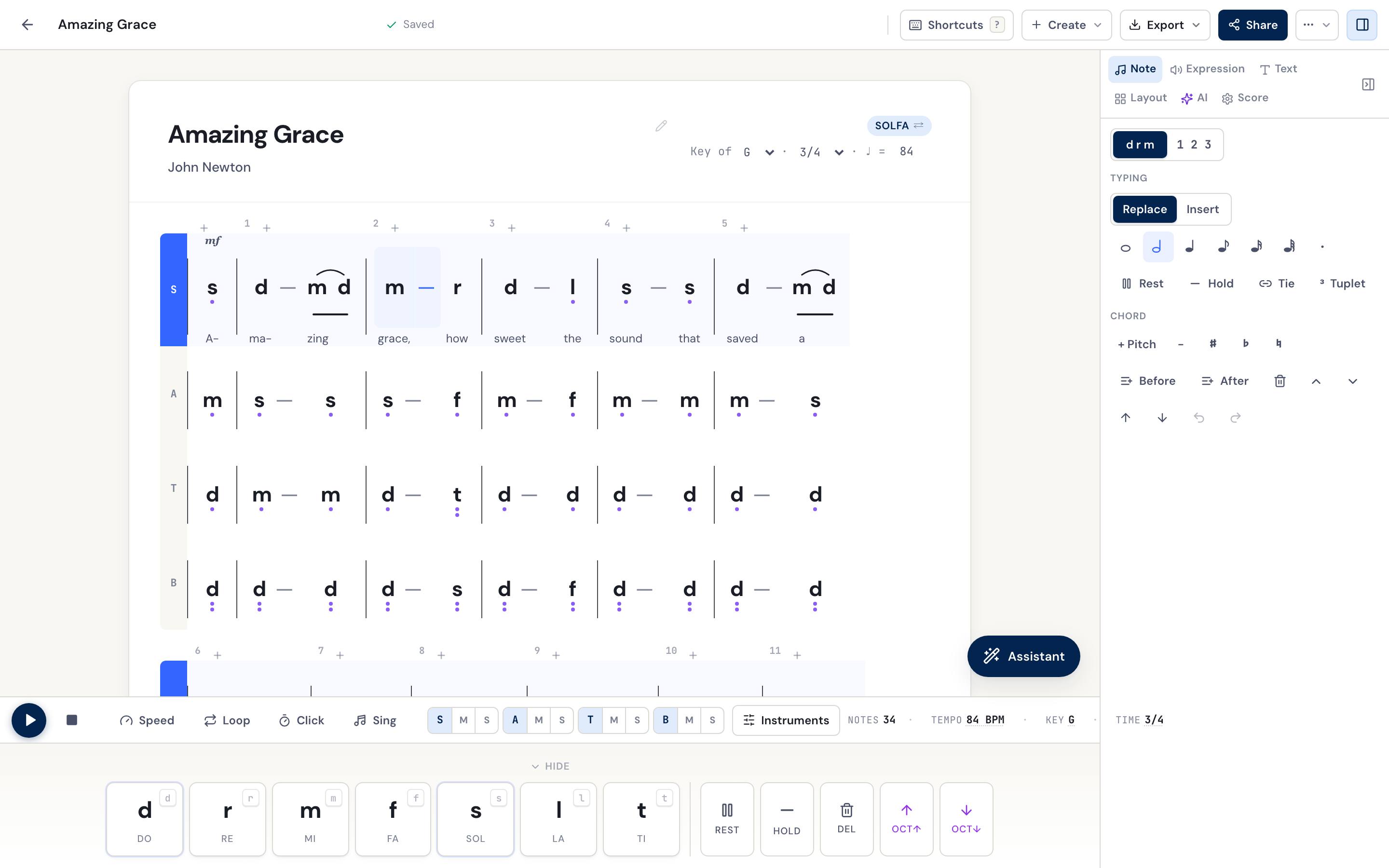
- You write solfa or jianpu as your primary notation. This is the case for most choir directors in Africa, the Caribbean, Filipino choirs, and Chinese/Taiwanese/Indonesian musicians. Flat.io can do solfa via plugins, but it’s adding solfa to a staff editor; DomiSol IS a solfa editor.
- Your choir runs through WhatsApp/Slack and reads on phones. DomiSol’s URL-share works on any phone, no account, no app install, and the score renders fast over slow cellular. Flat.io works on phones too but expects more device + account setup.
- You want AI to harmonize, transpose with voice-leading, hum-to-score, or translate lyrics across languages. These are DomiSol-specific features built around the choir-director workflow.
- You want it to stay free. DomiSol’s free tier is permanent for solfa/jianpu editing, playback and sharing, and it does not cap how many scores you keep. Flat.io has free + paid tiers and limits the free one to 15 scores.
- You print service sheets, not engraved scores. DomiSol’s hymnal-layout PDF writes the verses out in solfa or jianpu, the way an African or Indonesian hymnal actually prints, so the sheet you hand the choir is the sheet they sing from. Flat.io produces beautiful staff engraving, but not a solfa/jianpu service sheet with the stanzas spelled out.
- You start from a photo of an existing hymnal. Snap a page from a hymnbook, printed or handwritten, and DomiSol’s image recognition turns it into an editable solfa or jianpu score. Even where a staff editor offers scanning, it lands you back in five-line notation; DomiSol lands you in the notation your choir actually reads.
The honest recommendation
Two flowcharts, depending on what you read:
If you read staff notation as your primary musical language: Use Flat.io. DomiSol may not be the right tool for your workflow today. We’re not trying to displace staff editors, we’re filling a gap they don’t address well.
If you read solfa or jianpu as your primary musical language: Use DomiSol. We built it specifically for you and the workflow tradeoffs in your favor are real (SATB harmonize, WhatsApp sharing, free permanent).
If you straddle both worlds: Use both. Many choir directors do. Use Flat.io for staff scores they share with instrumentalists and orchestra leaders; use DomiSol for solfa/jianpu hymn arrangements they share with the choir. Export between the two via MusicXML when needed.
Related reading
- SATB hymn arranging in tonic solfa, voice-leading, ranges, cadences for choir directors
- Convert sheet music to solfa, bring your existing scores into a solfa workflow
- The best tools for writing jianpu, broader survey including MuseScore, LilyPond, and others
- An AI music assistant for choir directors, harmonize, transpose, and arrange your score by just asking in plain language
Frequently asked questions
- What's the main difference between DomiSol and Flat.io?
- Flat.io is a general-purpose web-based notation editor optimized for staff notation, with global reach and a polished SaaS experience. DomiSol is a niche editor optimized for tonic solfa and jianpu, the notations used by African church choirs, Chinese instrumentalists, and global hymnody, with WhatsApp-friendly sharing and a workflow built around how those communities actually rehearse. If you write staff music, use Flat.io. If you write solfa or jianpu, use DomiSol.
- Is DomiSol free?
- Yes. Solfa and jianpu editing, playback, sharing and solfa/jianpu PDF are free permanently; Pro covers the AI credits and the print-ready exports (watermark-free PDF, staff notation, MIDI, MusicXML).
- Is Flat.io free?
- Flat.io has a free tier that's generous for individuals (up to 15 scores) and a paid plan starting around $10/month for unlimited scores and additional collaboration features. Pricing changes; check flat.io/pricing for the current tiers.
- Can I use both?
- Absolutely, the tools solve different problems. Many choir directors use Flat.io for staff scores they share with instrumentalists and DomiSol for solfa/jianpu hymn arrangements they share with the choir.
- Can I import my Flat.io scores into DomiSol?
- Yes, export your Flat.io score as MusicXML, then import into DomiSol via Create → Import MusicXML / MIDI. The conversion preserves notes, key signature, time signature, and tempo. You can then edit in solfa or jianpu and re-share via URL.