Every choir director knows the Saturday-night ritual. You have a melody — one you wrote, or one a member hummed to you after the service — and you need it in four parts by tomorrow morning. So you sit down and work out the alto, then the tenor, then the bass, one bar at a time. Then someone mentions the sopranos can’t reach the top of the phrase, and you transpose the whole thing down a step. It’s satisfying work. It’s also slow, and it always seems to happen the night before you need it.
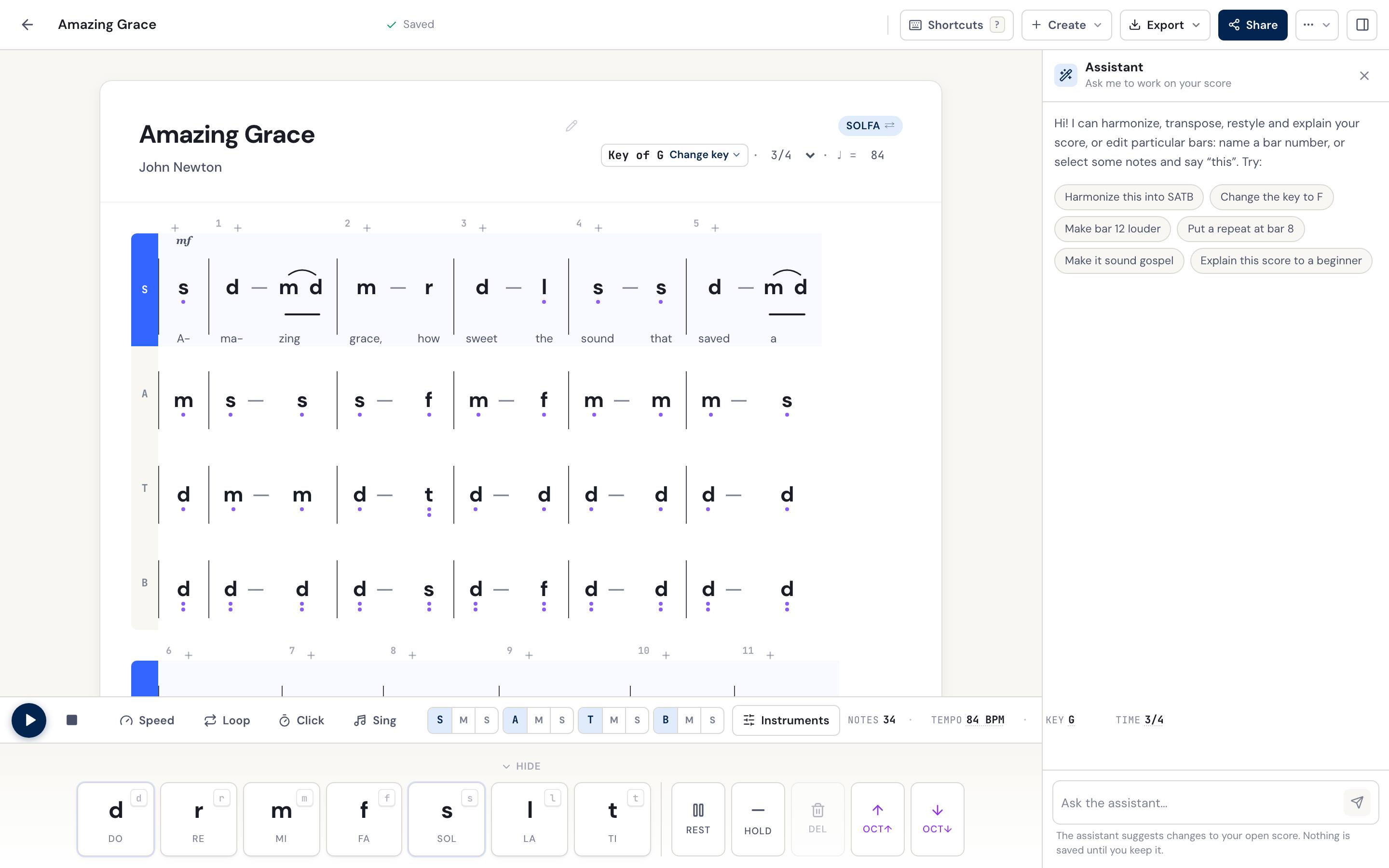
DomiSol’s AI music assistant is built to take the slow part off your hands. It’s a conversational assistant that lives inside the score editor: you type what you want in plain language — “harmonize this into SATB and move it down to E flat” — and it does the work on the score in front of you, in tonic solfa or jianpu. You stay the musician. It handles the mechanical middle.
What is the DomiSol AI assistant?
The DomiSol AI assistant is an in-editor helper you talk to in plain language to write and arrange music. You open a score, tell it what you want, and it edits that score directly — harmonizing a melody, transposing it, composing a new tune, shaping dynamics, or writing lyrics.
What sets it apart from a general chatbot is that it isn’t a separate window you copy and paste in and out of. It works on your open score, and it drives DomiSol’s own music tools — the same harmonize, transpose, and arrange features that already power the editor. You’re not getting a chatbot’s guess at music theory; you’re getting DomiSol’s music engine, pointed at your score by a plain-language request.
What you can ask it to do
One assistant is a doorway to nearly everything DomiSol’s AI can do. Instead of hunting through menus for the right button, you describe what you want and it picks the tool. A few of the things choir directors reach for most:
- Harmonize a melody into SATB — “Harmonize this melody into four parts for my choir.”
- Transpose / change key — “Move it up to F so it sits better for the sopranos.”
- Compose a new melody — from a theme or from your lyrics — “Compose a gentle 3/4 hymn tune for communion.”
- Extend what you’ve written — “Add four more bars in the same style.”
- Write or translate lyrics — “Write lyrics for this melody about gratitude,” or “Translate these lyrics into Yoruba.”
- Restyle the whole piece — “Arrange this as a gospel setting,” or “…as a Yoruba praise chorus.”
- Add expression — “Add dynamics and a ritardando at the end.”
- Explain it / conductor’s notes — “Give me rehearsal notes for the tricky bars.”
How to use it
Getting started takes about ten seconds:
- Open a score in the DomiSol editor — one of yours, or a fresh blank one.
- Open the assistant — the Assistant button in the AI tab, or the floating button at the bottom-right of the editor.
- Type what you want in plain language and send it.
- Review, and keep — or revert. The canvas updates with the change. Every turn is a single step back if it’s not what you had in mind, so you can experiment without fear of losing your work.
Because each request is one revertible change, the assistant is safe to think out loud with. Try a gospel restyle, hear it, undo it, try a folk setting instead. You’re not committing to anything until you decide you like it.
Why this matters for choir directors
The point isn’t novelty — it’s the hours it gives back, without pulling you out of the notation your choir actually reads.
You never have to detour through staff notation to get four parts. You harmonize, transpose, and arrange while staying in solfa or jianpu the whole way, so what comes out is what your singers can read on Sunday. When the range doesn’t fit a section, you fix it with one sentence instead of rewriting every line by hand. And because DomiSol is web-based, the moment an arrangement is ready you can share the link with your choir on WhatsApp — no files to email, no software for anyone to install.
It works the same whether your choir sings from tonic solfa or from jianpu, so the assistant fits the tradition you’re already in rather than asking you to change it.
What it doesn’t do (yet)
We’d rather be honest about the edges than oversell.
It’s young software, so you’ll still meet the occasional rough spot. It works at the arrangement level — harmonize, transpose, restyle, dynamics — not fine-grained note-by-note surgery; for that, edit directly on the canvas, which is often quicker anyway for a single tweak. It needs a saved score to work on. And it’s a drafting partner, not a finished-recording button: always give what it writes a pass with your own ear, and shape the phrases that matter to you. It gets you to a strong first draft fast — the interpretation is still yours.
Related reading
- DomiSol for church choirs — the workflow this assistant was built for
- SATB hymn arranging in tonic solfa — what “harmonize into SATB” actually means
- Writing a hymn in solfa — the from-scratch workflow, by hand and with AI
- Transposing solfa — the theory behind the one-line transpose request
- DomiSol vs Flat.io for choir directors — if you’re choosing an editor
- Try it now: dash.domisol.app
Frequently asked questions
- What is an AI music assistant?
- An AI music assistant is a tool you talk to in plain language to write and arrange music. In DomiSol it lives inside the score editor: you type a request like 'harmonize this into SATB and move it up to F,' and it edits the open score in solfa or jianpu. It drives DomiSol's existing music tools — harmonize, transpose, compose, dynamics, lyrics — rather than being a separate chatbot you copy in and out of.
- Can AI harmonize a melody into SATB?
- Yes. Give DomiSol's assistant a melody line and ask it to harmonize into SATB, and it writes soprano, alto, tenor, and bass parts, carrying your lyrics across the voices. You can keep going in the same conversation — ask it to transpose the result for your singers' range, add dynamics, or restyle it as gospel or a Yoruba praise chorus.
- Does the assistant work with both solfa and jianpu?
- Yes. DomiSol stores every score in one movable-do model and displays it as tonic solfa (d r m f s l t) or jianpu (1 2 3 4 5 6 7) with a one-click toggle, so the assistant works exactly the same whichever notation your choir reads.
- Is the AI assistant free?
- Every account starts with free AI credits, and the rest of DomiSol — writing, playback, sharing and solfa/jianpu PDF — is free permanently. Heavier AI use runs on a paid plan or a credit top-up, because each call costs real money to run.
- Does it replace my existing score or edit it in place?
- It edits the score you have open, in place, and each request is a single revertible change — if you don't like what it did, one click puts it back. Composing a brand-new melody from scratch is a separate action you choose deliberately, so the assistant won't overwrite your work unless you ask it to start fresh.
- Do I still need to know music theory to use it?
- No — you ask in plain language. But the assistant is a drafting partner, not a substitute for your ear: review what it produces and adjust the spots that don't sit right. It gets you to a solid first arrangement far faster than starting from a blank page, and you make it yours from there.