MuseScore is the free notation program most musicians already have, so it is the first place people look when they need jianpu. The short answer is that MuseScore does not write jianpu. It has been asked for since MuseScore 3, and the code proposed for it has not been merged. What exists are community plugins that take a score written on a staff and write jianpu numbers onto it.
That is useful, as long as you know what you are getting. This guide covers the two plugins that work with MuseScore 4 today, how to install one, the setting that makes the numbers come out right, and what to do when you need a real jianpu page rather than a staff with numbers on it.
The two plugins
Jianpu Numbered Notation
This is the one most people find first. Its page on musescore.org has a file for each generation of MuseScore: MuseScore 2, 3.3, 3.5, 4, and one marked for MuseScore 4.4 and later, which is the one to use on a current install.
What it does, read from the plugin itself:
- For each note in one voice, it adds a line of staff text under the staff: the number 1 to 7, with a sharp or flat where the note has one.
- A rest becomes 0.
- Octaves are marked with dots and colons beside the number:
.1is an octave up,1.an octave down, and a colon counts two. - Which pitch is 1 is a number you type in, as a MIDI note. It starts at 60, which is middle C. The plugin does not read the key signature.
- It works on the bars you select, or on the whole score. Its dialog also sets the text size, its position, its colour and which voice to read.
What it does not do is the rhythm. There are no underlines for quavers and no dashes for held notes. The staff above the numbers still carries the rhythm, so what you have is a staff score annotated in numbers. That is fine for a player who reads a little of both, or for checking a transcription. It is not what a choir that reads only jianpu expects to be handed.
Integer notation (pitch class) or numbered notation (Jianpu)
The second plugin, by Mind-Ext, supports MuseScore Studio 4.4 and later
only. It comes in two versions. The Inside version puts the numbers on
the staff and hides the noteheads, which gets closer to the look of a jianpu
page. The staff lines stay unless you hide them yourself, and since a hidden
notehead can no longer show a half note from a quarter, half notes are set in
italics. You choose the reference note, for example 1 = E♭4. The Outside
version writes the numbers outside the staff instead.
Its author calls it experimental, and its page asks you to back up your score before running it. Take that seriously: try it on a copy first.
Installing a plugin in MuseScore 4
In MuseScore 4 you install a plugin by putting its file in a folder and switching it on.
- Download the
.qmlfile from the plugin’s page on musescore.org. If the browser opens it as a page of code, go back, right-click the link and choose Save link as. - Move it into the Plugins folder. By default that is
Documents\MuseScore4\Pluginson Windows and~/Documents/MuseScore4/Pluginson macOS and Linux. Preferences → Folders shows where yours is. - Enable it. Open Home → Plugins (or Plugins → Manage plugins), select the plugin and click Enable.
- Run it. With your score open, choose it from the Plugins menu.
Setting “1” to the key of the song
This is where most people go wrong. Jianpu is movable do: 1 is whatever the
key says it is, and a song in G is written 1 = G. The Jianpu Numbered Notation
plugin counts from middle C unless you tell it otherwise, so on a song in G it
prints the numbers of C major, every one of them wrong.
Before you click OK, set the box labelled '1' is C4=60 (MIDI num.) to doh:
| Key of the song | Type this (MIDI note) | or, a doh an octave lower |
|---|---|---|
| C | 60 | 48 |
| D | 62 | 50 |
| E♭ | 63 | 51 |
| E | 64 | 52 |
| F | 65 | 53 |
| G | 67 | 55 |
| A | 69 | 57 |
| B♭ | 70 | 58 |
Pick the doh nearer the middle of your melody, so that most of its notes come out with no octave mark at all. Most songs in G read best with 67. If most of the tune then comes out marked an octave down, undo and run it again with 55.
A song that changes key needs the plugin run once for each section, with the number changed each time.
When you need a real jianpu page
Both plugins decorate a staff score. If the people you write for read only
jianpu, they need the numbers with the rhythm drawn the jianpu way: an
underline under each quaver, a dash for each extra beat of a long note, the
octave dot above or below the number, and 1 = G at the top. There are two
ways to get there from MuseScore.
jianpu-ly and LilyPond
jianpu-ly, by Silas S.
Brown, is a Python script that turns jianpu written as text into a LilyPond
file, and LilyPond engraves it properly, underlines, dots and lyrics included.
It is free and the output is excellent. It also runs from the command line: you
install it with pip, write the music in its text format, and run LilyPond on
the result. It can read a MusicXML file too, which its author describes as
experimental and not working for every piece, so check what comes out.
Open the MuseScore file in DomiSol
DomiSol writes jianpu as the notation itself, so the other route is to move the score across and print it there.
- In MuseScore, choose File → Export and save the score as MusicXML.
DomiSol reads
.musicxml,.xmland.mxl, but not.mscz, MuseScore’s own format. - Open the editor at dash.domisol.app and choose Create → Import MusicXML / MIDI, then pick the file.
- DomiSol works out the key and writes every note as a scale degree, so the score arrives as real jianpu (or solfa), not as a picture of a staff. The words come in under their notes, verse by verse. A hymn written on two staves arrives as four parts, soprano, alto, tenor and bass. An upbeat the file marks as a pickup bar stays an upbeat.
- Switch the score to
1 2 3if it opened in solfa, play it once to check it, and export the PDF.
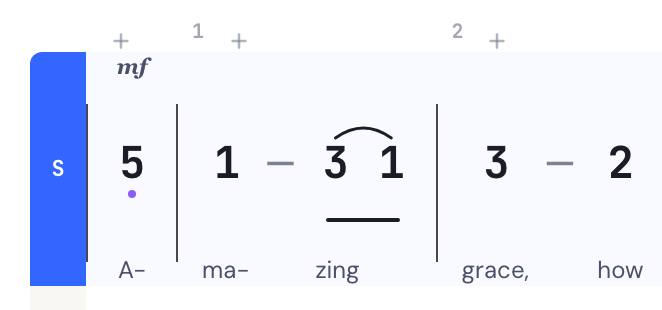
Importing a file costs nothing, and the jianpu PDF is free (with a DomiSol watermark on the free plan). Going back the other way, Export → MusicXML writes a file MuseScore opens as a staff score; that export is on the paid plans.
Which to use
| You want | Use |
|---|---|
| A staff score, with numbers added for a player who reads both | Jianpu Numbered Notation, with 1 set to the key |
| Numbers on the staff in place of noteheads, and you will hide the lines | Mind-Ext’s Integer notation plugin, Inside version, on a copy |
| Fine engraved jianpu, and you are at home on a command line | jianpu-ly and LilyPond |
| A jianpu page a choir or a class can read, from a score you already have | Export MusicXML and open it in DomiSol |
If you write jianpu more than you write staff, it is worth trying the last one the other way round too: write the music in jianpu to begin with, and export staff notation or MusicXML only when someone needs it.
Related reading
- The best tools for writing jianpu: MuseScore, LilyPond, DomiSol and the rest, compared
- How to read jianpu: numbers, dots, underlines and dashes
- Staff notation to jianpu: what changes when a staff score becomes numbers
- Photos, files and recordings: every detail of a MusicXML import
- The jianpu editor: write jianpu in the browser
Frequently asked questions
- Can MuseScore write jianpu?
- Not by itself. MuseScore Studio 4 has no jianpu or numbered-notation mode. Community plugins add jianpu numbers to a score written on a staff: the Jianpu Numbered Notation plugin writes them under the staff, and Mind-Ext's Integer notation plugin can put them on the staff in place of the noteheads.
- Which jianpu plugin works with MuseScore 4?
- Both of the maintained ones. The Jianpu Numbered Notation page on musescore.org has a separate file for MuseScore 4.4 and later, beside older files for MuseScore 2 and 3. Mind-Ext's Integer notation (pitch class) or numbered notation (Jianpu) plugin supports MuseScore Studio 4.4 and later only.
- Why are the numbers from the MuseScore jianpu plugin wrong?
- Almost always because of the key. The Jianpu Numbered Notation plugin does not read the key signature: its dialog has a box that says which pitch is 1, and it starts at MIDI note 60, middle C. For a song in G, set it to 67 (or 55 for the G below), and the numbers come out as the song's jianpu.
- Does the MuseScore jianpu plugin show the rhythm?
- No. The Jianpu Numbered Notation plugin writes the numbers, the octave marks and 0 for a rest, and leaves the rhythm to the staff above it. It draws no underlines for short notes and no dashes for long ones, so the result is a staff score with numbers, not a jianpu page.
- How do I turn a MuseScore score into a jianpu PDF?
- In MuseScore choose File, then Export, and save as MusicXML. In DomiSol choose Create, then Import MusicXML / MIDI, and pick the file. DomiSol works out the key, writes every note as a scale degree, and brings the words in under their notes. Switch the score to jianpu and export the PDF.