Tonic solfa is one of the easiest music notation systems to teach. The Curwen method has been used in classrooms since the 1840s and produces literate sight-singers within weeks rather than months. What’s changed in 2026 is the availability of free digital editors that give students instant audio feedback, and that turns out to make a real pedagogical difference.
This guide is a 6-lesson curriculum for music teachers, choir directors, homeschooling parents, and anyone teaching solfa to a beginner or beginner group. Each lesson assumes you have a digital editor available (we’ll use DomiSol, but MuseScore with the solfa plugin or any other solfa-aware tool works the same way).
Before you start
You’ll need:
- A digital editor projected on a screen, OR a tablet/laptop the class can crowd around. We use DomiSol because it’s free and runs in the browser, but the lessons work in any solfa-capable editor.
- 30-45 minutes per lesson for a structured class; 15-20 minutes for a casual choir rehearsal warm-up.
- Optional: printed handouts (DomiSol exports A4 PDFs you can run off in the school photocopier).
You don’t need:
- Prior music training (yours or theirs)
- Instruments (solfa is sung, not played)
- A piano (the editor’s playback gives students the reference pitch)
- Sheet music (you’ll create everything in the editor as you go)
Lesson 1, The pentatonic core (d r m s l)
Objective: Students can sing the five-note pentatonic scale in any order and echo short 4-note motifs.
Why pentatonic first: No half-steps means every interval feels naturally singable. The pentatonic scale is what folk songs in nearly every culture use; it sits comfortably in human voices and avoids the “wait, that note feels wrong” hesitation that fa and ti can cause beginners.
Step-by-step:
- Open the editor. Type
d r m s lslowly, having the class echo each syllable. - Click play. Students hear the pattern back. Have them sing along.
- Reverse it:
l s m r d. Same drill. - Mix it up: type
d m s d(a doh-mi-soh arpeggio). Students sing. - Have students suggest 4-note patterns. Type what they suggest, play it back, sing together.
| d : r : m : s | l : s : m : r |
| d : m : s : l | d : - : - : - |
Common pitfall: Students often sing d r m s l correctly going up but fall apart coming down. The descending direction needs as much practice as the ascending. Spend equal time on l s m r d.
Lesson 2, Adding fa and ti (the half-steps)
Objective: Students can sing the full diatonic scale d r m f s l t d' and identify the half-step intervals (mi-fa, ti-doh).
Step-by-step:
- Recap the pentatonic from Lesson 1.
- Sing the major scale together:
d r m f s l t d'. Use a familiar tune as a memory aid, the opening of “Doh-Re-Mi” from The Sound of Music or the first notes of “Joy to the World”. - Highlight the half-steps. The interval from mi to fa is HALF of the others. Same with ti to doh. Have students sing just those two pairs back-to-back to feel the tighter spacing.
- Type a melody that uses fa and ti prominently. Play it. Have students sing it.
| s : d  | d : r  | m : -  | r : -  |
| s : d  | d : r  | m : -  | r : -  |
| s : d  | d : r  | m : f  | s : -  |
| s : f  | m : r  | d : -  | - : -  |
Common pitfall: Singing fa flat (closer to mi than to soh) and ti sharp (closer to doh than to lah). The half-steps want to “lean” toward their resolution. Use the editor’s playback to show students the in-tune version, then have them match.
Lesson 3, Octave dots and the higher register
Objective: Students recognize and sing notes an octave above the middle range.
Step-by-step:
- Sing an octave together:
d ... d'. Most students can hear the relationship intuitively. - Show that a dot above the syllable in the editor means “one octave higher”. Type
dandd'next to each other. The visual difference is one dot. - Sing an ascending scale crossing the octave:
d r m f s l t d'. Then descend:d' t l s f m r d. - Have students sight-sing a melody that uses the higher register.
| d : m : s : d’ | t : l : s : f |
| m : s : d’ : - | - : - : - : - |
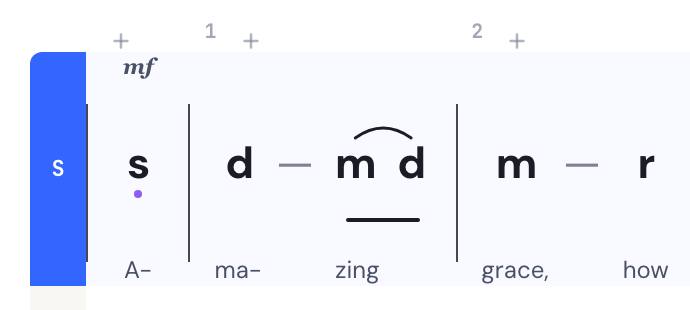
Common pitfall: Sopranos rush up to the high d' because they’re excited about reaching it; altos drop into chest voice on the low d. The editor’s playback maintains a consistent timbre across octaves, a useful reference for students learning to keep their tone steady.
Lesson 4, Rhythm: durations and bar lines
Objective: Students can clap rhythms written in solfa notation and sing pitch + rhythm together.
Step-by-step:
- Introduce the duration symbols. In tonic solfa: a plain note is one beat (quarter note); a dash extends a note for another beat; a dot before a syllable subdivides into eighths.
- Have students clap the rhythm WITHOUT singing pitches. Just
clap clap clap clapford d d d. - Add the pitches: now sing
d d d d. - Introduce dashes (held notes):
d d d -is “doh doh doh, hold for one more beat”. - Introduce subdivisions:
d .r m sreads as “doh, then re-and-mi as eighths, then soh”. - Bar lines: walk through how
| d r m f | s l t d' |groups beats into measures. Don’t dwell, just establish that bar lines are organizational, not pitched.
| d : d : r : m | s : - : - : - |
| s : .l : .s : f | m : - : r : - |
| d : - : - : - | - : - : - : - |
Common pitfall: Students sing rhythms metronomically and feel artificial. Encourage natural phrasing: a held note is held with breath support, not just a clock-tick.
Lesson 5, Sight-singing using the editor’s playback
Objective: Students can sing a short, unfamiliar melody from the editor screen WITHOUT hearing it first, then self-correct using playback.
Step-by-step:
- Project a 4-bar melody on the screen. Don’t play it yet.
- Give students 30 seconds to scan it silently. They should mentally hear it.
- Have them sing it together. Don’t help.
- Play the editor’s audio. Students hear what they got right and what they got wrong.
- Sing it together a second time, now corrected.
- Repeat with a slightly harder melody.
This is THE pedagogical move that’s hard to do without a digital editor. On a chalkboard, the teacher has to play the reference at the keyboard while students sing, which is fine but creates a power dynamic where the student is dependent on the teacher’s accuracy. With the editor, the reference is impartial. Students learn to trust their own ears against the playback rather than against the teacher.
Lesson 6, Composing a short melody together
Objective: The class collaboratively writes a 4-bar melody, learning melodic shape, cadence, and the difference between step and leap.
Step-by-step:
- Discuss what makes a melody “feel finished”. Two principles to convey:
- Phrase shape: Most singable melodies arc, they rise, then fall. Pure ascending or pure descending lines feel incomplete.
- Cadence: The final note should usually be
d(the tonic). It’s where the music wants to come home. End onrortand the melody feels like it stopped mid-thought.
- Open a blank score in the editor. Have students suggest the first note. Type it.
- Suggest the second note. The class votes. Type it.
- Continue until you have 4 bars (16 beats in 4/4).
- Play it back. Discuss what works and what doesn’t. Edit.
- Add lyrics if appropriate (a short hymn line, a class motto, or just nonsense syllables).
- Share the finished piece. Use the editor’s URL-share to send it home with students or post it to the class group chat.
| d : m : s : - | l : s : m : r |
| d : r : m : f | s : m : r : - |
| f : m : r : d | t, : d : - : - |
| d : - : - : - | - : - : - : - |
The point of this lesson isn’t to produce a great melody, it’s to show students that solfa is a language they can compose in, not just a notation they read. Students who’ve composed even a clumsy melody read other people’s melodies with more empathy.
Reusing this curriculum
These six lessons cover roughly 4 weeks of weekly classes (or 1 week of daily summer-camp sessions). After completing them, students should be able to:
- Sight-sing simple diatonic melodies in the middle vocal range
- Recognize octave dots, durations, and bar lines
- Self-correct using playback feedback
- Compose short melodies with reasonable phrase shape and cadence
For continuing study, three follow-ups:
- SATB introduction: Once students are confident with single-line melody, introduce the soprano/alto/tenor/bass concept using a familiar hymn. See the SATB arranging guide.
- Jianpu cross-training: Show students that the same musical idea can be written in solfa OR in numbered notation
1 2 3 4 5 6 7. The skills transfer instantly. See the jianpu primer. - Importing existing scores: Once students are reading fluently, teach them how to import staff-notation scores into the editor and convert them to solfa. See the staff-to-solfa guide.
Related reading
- Tonic solfa primer, the underlying notation explained for students who want to read ahead
- SATB hymn arranging in tonic solfa, for choir directors moving into harmony
- An AI music assistant for choir directors, harmonize, transpose, and arrange a score by asking in plain words
Frequently asked questions
- What age can children start learning tonic solfa?
- Children can begin solfa-based ear training as young as age 4 (the Curwen-Kodály method targets early childhood). Reading solfa notation is age-appropriate from around 6-7 once basic literacy is established. Teenagers and adults can become functional sight-readers in 4-12 weeks of consistent practice.
- Do I need to be a trained music teacher to teach solfa?
- No. Solfa was specifically designed for non-specialist teachers (Sunday-school workers in Curwen's original audience). If you can sing the major scale, you can teach the basics. The first three lessons in this guide require no prior training; lessons 4-6 benefit from basic music literacy.
- How is teaching solfa different with a digital editor vs. on a chalkboard?
- Three main differences: (1) Instant audio playback lets students hear their work, which accelerates ear-training. (2) Editing is non-destructive, students can experiment without erasing the chalkboard. (3) Sharing is trivial: send the URL to parents, students, or other teachers. The chalkboard is still useful for warm-up exercises and quick demonstrations; digital tools are better for sustained composition work.
- What if my students don't have computers or phones at home?
- All exercises in this guide work on a single screen in the classroom, the digital editor is a teaching aid, not a homework tool. For home practice, distribute printed PDFs (DomiSol exports A4-printable PDFs in solfa). The combination of in-class digital + at-home printed is more accessible than digital-only.
- Can I use this curriculum for choirs as well as classroom teaching?
- Yes. The 6 lessons translate directly to a choir-rehearsal context, substitute 'choir members' for 'students' and 'rehearsal' for 'class'. Lesson 6 (composing together) is especially useful for choirs because it builds the directorial relationship between leader and singers.